Feature
Service Flow: repairs on a board, history on every vehicle
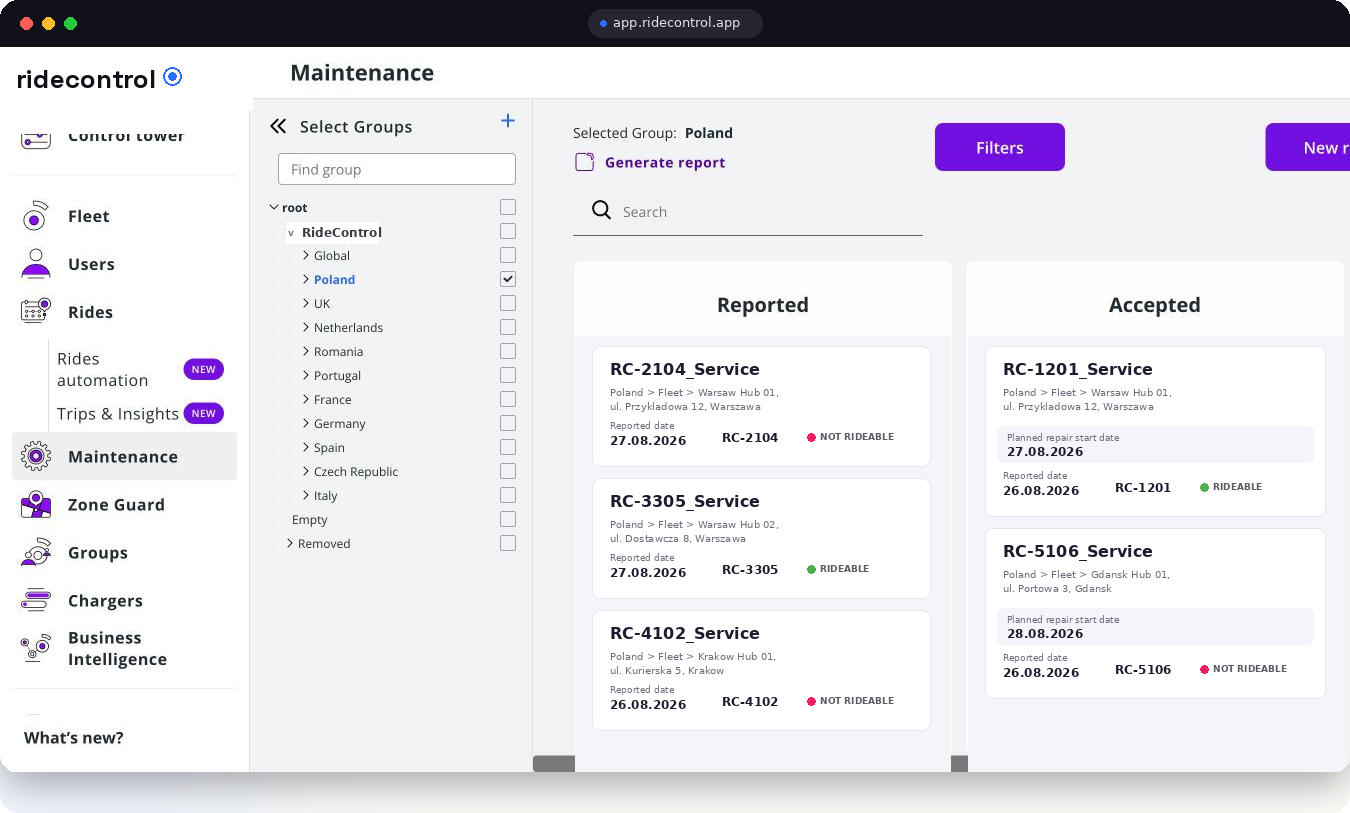
Breakdowns eat the margin of a delivery fleet. Service Flow turns repairs into cards that move from reported to accepted to in progress, each carrying the hub, the address, the planned repair date and whether the vehicle is rideable.
Workshop status
Repair accepted · RC-1201
What Service Flow does
- A kanban per fleet: reported, accepted, in progress, done.
- Every card carries hub, address, vehicle, reported fault, planned repair date and rideable status.
- Mechanics work the board on a phone, in the yard, without a laptop.
- Every closed repair stays in the vehicle's service history, with dates and what was done.
- Requests can come from a courier, a hub lead, a Control Tower alert or a planned maintenance interval.
How it works
Step 1
A fault is reported
A courier or hub lead raises a request against the vehicle, or it is created from an alert on Control Tower.
Step 2
The workshop accepts it
The card moves to accepted with a planned repair date, so the hub knows when the vehicle comes back.
Step 3
Repair happens
The mechanic updates the card in progress, records what was replaced, and marks the vehicle rideable or not.
Step 4
The vehicle returns to service
Closing the card returns the vehicle to the available pool and writes the repair into its history.
Step 5
The month is reviewed
Repair counts, downtime and recurring faults per model feed the BI dashboards and cost per vehicle.
Who uses it
| Role | What they use it for |
|---|---|
| Courier | Reporting a fault against the vehicle they were riding |
| Mechanic | Working the board, recording parts and closing repairs |
| Workshop lead | Planning the week, seeing what is rideable and what is not |
| Hub lead | Knowing how many vehicles are available for tomorrow's shifts |
| Finance | Repair volume and cost per vehicle per hub |
Data you get out
- Service request export with hub, vehicle, dates and status.
- Per-vehicle service history, from first repair to last.
- Downtime per vehicle and per model, feeding availability numbers.
- Webhooks on service due and status change for your own systems.
Related modules
Device diagnostics catches faulty IoT units before a courier reports them, battery and asset inventory tracks the packs a repair consumes, and BI dashboards turn repairs into cost per vehicle. Servicing itself can be run with RideCare on the same software, under agreed SLA and uptime targets.
Frequently asked questions
Related
See it on your own fleet
Book a 30-minute walkthrough. We open the panel with your vehicle types, hubs and countries in mind — no slides.
Book a demo